Mar 21 2011

Cloud Computing in Dublin

Category: Cloud ComputingTeknovis @ 6:22 pm

Amazon, Microsoft, and many more see Dublin as an ideal location for their data centres according to Dublin Emerges as Cloud Computing Hub.

Some of the linked articles are also very interesting, such as Colocation Dublin that lists all of the data centres in the Dublin area.

Tags: , ,


Jul 27 2010

Non-Contiguous Ranges in Microsoft Excel

Category: WindowsTeknovis @ 5:12 pm

I was going mad today trying to select a non-contiguous range in Microsoft Excel until I came across this tip:

Any range can be non-contiguous. All you do is, as you are selecting cells with the mouse, hold the Control key down. You will be able to select as many disjoint blocks of cells on one sheet as you like. All Excel ranges can only be on one sheet, so your non-contiguous blocks cannot be on separate sheets, and cannot span sheets.

It is taken from Excel’s Non-Contiguous Ranges.

Tags:


Jun 14 2010

VirtualBox on my Laptop

Category: SoftwareTeknovis @ 7:05 pm

Last week I finally got my new laptop! I did get a Dell, but I did not get the Studio that I was considering in Virtualising my Laptop. The laptop came with Windows 7, and for the moment I have decided to leave that as my host operating system. However, I am already hating it, but I will leave that for another blog post…

After reading the articles described in VMware Workstation Versus VirtualBox I decided to try using VirtualBox, and I installed version 3.2.4. It installed perfectly.

I then tried to create my first virtual machine. This is where I had a few problems, that I will describe here:

  • I was unable to assign more than 1500MB of Memory to my virtual machine :( After some research online I discovered this is a limitation of using a 32bit host operating system :o
  • I assigned my virtual machine 2 processors since my laptop is dual core. However, when I tried to start the virtual machine I got an error code (VERR_VMX_MSR_LOCKED_OR_DISABLED). It turns out that this means that the required hardware support for virtualisation is disabled in the BIOS. It was a bit tricky, because after changing this BIOS setting a hard reboot is required for it to become active – the normal soft reboot is not sufficient.
  • I needed to install the Guest Additions in order to get the guest operating system to correctly identify and use my monitor resolution.

Since then everything has been working perfectly, and so far I have been very impressed!

Tags: , , ,


May 03 2010

Microsoft PowerPoint Overkill

Category: Humour,WindowsTeknovis @ 10:55 am

I read this great article about Microsoft PowerPoint: We have met the enemy, and he is PowerPoint.

The direct link to the slide mentioned in the article is Afghanistan Stability/COIN Dynamics.

I think that it is priceless!

Tags:


Mar 14 2010

Virtualising my Laptop

Category: Hardware,Linux,WindowsTeknovis @ 2:41 pm

I want to buy a new laptop for myself. I need it! My old one is too big and heavy, the screen is losing its contrast, and the battery lasts for approximately 30 seconds :(

In the past I tended to buy high-end laptops on the basis that they would last for longer. This worked to a certain extent, but this time I want to try a new approach. I am going to buy a relatively low-end laptop, but replace it more frequently. The disadvantage of this approach is that it is very time consuming to setup a new computer.

Last year I started experimenting with using Ubuntu within VMware as my main desktop operating system on and old computer. I was very impressed with its speed and stability. So I have decided that I am going to virtualise my entire desktop on the new laptop. The advantages of this approach are:

  • Moving my computer from one piece of hardware to another becomes trivial. This is useful for when I want to upgrade my laptop in the future. It also means that I can put my computer onto an external hard disk.
  • Backing-up my computer also becomes trivial. I am thinking about backing it up automatically every night!
  • Snapshots can be taken before I install any software on a test basis. I can then roll-back my computer if I do not like the new software.
  • It provides my computer with a lot of extra security from network based attacks.

My overall requirements for my new laptop are that it supports three different virtual machines:

  • I want to start using the Ubuntu based virtual machine as my main computer. I am waiting for Lucid Lynx 10.4 LTS.
  • I am currently using Windows 2000 as main my operating system. I think it is great ;)
  • Unfortunately, I have one program that I need to use regularly, and this program requires Windows XP (or later) :(

I will use NAT to network all three virtual machines most of the time. However, sometimes I will need to use the Windows 2000 virtual machine in bridged mode so that it can be a first class member of my domain.

Therefore, the overall architecture of what I am trying to achieve should look like this:
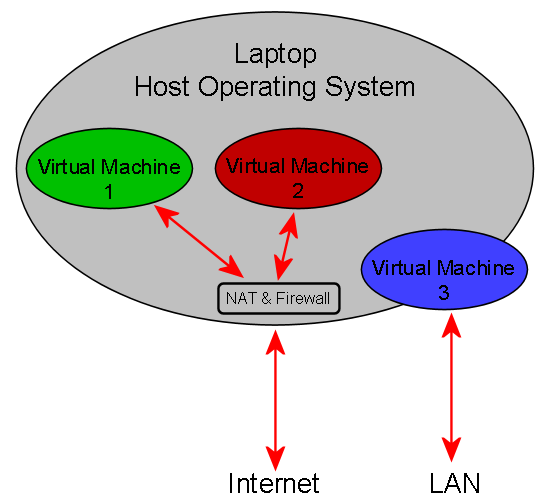
Laptop Virtual Architecture

Laptop Virtual Architecture

Now that I know what I want to achieve, I just need to find the best way to realise this!

Hardware

I am currently considering buying either a Dell Inspiron 1545Inspiron 15 Intel Core i, or a Studio 15. I am a Dell fan, and a 15″ screen is the best size for me. I will get 4GB of RAM, and either a 350GB or a 500GB hard disk.

I will get one of the cheapest processors available. I am currently considering either the Intel Pentium Dual-Core Processor T4400 or the Intel Core i3-330M. I will probably choose the latter, because it seems to have better support for virtualisation because it supports VT-x according to its specification. In practice I do not know if this will provide a noticeable benefit.

In terms of form-factor, I dislike the idea of a number keypad on a laptop. Therefore, I will probably go for a Studio 15.

I am going to have to buy an external card reader, because none of these laptops support Compact Flash cards :( My cameras all use Compact Flash :o

I wonder how the host operating systems sees the integrated web camera. I hope that it appears as a standard USB device, so that it can easily be shared with the virtual machines.

Host Operating System

My requirements for the host operating system are:

  • It must be very secure, because I will use my laptop in a lot of public networks.
  • It must be easy to connect to file servers. This is important, because I will need to back-up my virtual machines.
  • It must have a software based firewall that is very easy to configure precisely.

I think that the clear winner here is Ubuntu with Firestarter. If my Linux skills were better I would use Debian instead :o

The only question I have is whether I should use the 32bit or the 64bit version of Ubuntu?

Virtual Machine Software

The two options that I am considering for this are VMware Workstation and VirtualBox. My main requirements are that the virtual machine software is secure, and that it supports VT-x. I think that both do!

However, there are still some issues that I have not resolved:

  • Should I use the 32bit version or the 64bit version?
  • Which offers better performance?
  • Will they both support my hardware equally well?
  • Is there a risk of becoming locked into one of these products?
  • How is Hyper-threading supported? Presumably, the virtual machine software would think that it has four cores to distribute to the virtual machines. However, in reality it would only have two. This makes me think that I should disable Hyper-threading.
  • Does the virtual machine file format change with each new release of the virtual machine software?

Cost is not really an issue here.

Guest Operating Systems

As I wrote above, I will use Ubuntu, Windows 2000, and Windows XP on my virtual machines.

My questions relating to the guest operating systems are:

  • Should I choose the 32bit or the 64bit version of Ubuntu?
  • Will the OEM version of Windows XP that I got with a previous Dell computer install into a virtual machine without lots of registration issues?

If anybody has any opinions, experience, advice, or answers relating to any of this then I would love to read them!

Thanks!

Tags: , , , , , , , , ,


Mar 06 2010

Cloud Computing Data Centres in Ireland

Category: Cloud Computing,HumourTeknovis @ 9:29 pm

I read an interesting article in The Irish Times recently about Microsoft‘s view on cloud computing data centres in Ireland. The article covers comments by John Vassallo who is Microsoft’s Vice-President of EU Affairs, and it can be read online at Data centres may attract 20,000 firms.

It is a short (and slightly meaningless) article. However, one comment by John Vassallo really caught my attention:

Mr Vassallo added that Ireland was cited in a recent publication as “a beautiful place for a data centre” due to its climate.

It is difficult to interpret this comment! I am not even sure if this is serious! Perhaps the cloud analogy is being taken too far :D

Tags: , ,


Jun 23 2009

Annoying Adobe Acrobat Toolbar

Category: WindowsTeknovis @ 7:24 pm

This great tip describes how to remove the really annoying Adobe Acrobat toolbar from Microsoft Office: Removing and Reinstalling Acrobat PDFMaker (6.0 for Office 2000 or XP).

Tags: ,


Jun 04 2009

Bing

Category: Internet,Location Based ServicesTeknovis @ 9:50 pm

I am hearing and reading a lot about Bing this week! Microsoft seems to be putting a lot of resources behind it! I have not tried using it yet. This is mostly because I am happy with Google, so there is no real incentive for me to change my search engine. I previously had very bad experiences with Cuil. (I must write about them here :o )

Today somebody showed me the Maps feature of Bing. I thought that the interface seemed nice, and the satellite photos were good. It certainly is as good as Google Maps.

However, then I was shown the Bird’s Eye view! This really impressed me!

Bird's Eye view of Camp Nou in Bing Maps

Bird's Eye view of Camp Nou in Bing Maps

Above you can see the Bird’s Eye view of Camp Nou (home of the 2009 Champions League winners).

Tags: , ,


Mar 18 2009

Irish Companies involved in OMA

Category: Mobile Computing,StandardsTeknovis @ 7:59 pm

Today I am going to focus on the Irish involvement in another international standards body called the OMA (Open Mobile Alliance). Information about the history and goals of the OMA can be found in About OMA. There are 4 different levels of membership of the OMA, and these are described in OMA Membership. However, I am not going to distinguish between these membership types. I am basing my lists on the memberships lists in Current OMA Members.

The Irish companies that are currently members are:

The non-Irish companies that have technical operations in Ireland that are currently members are:

As always, it is difficult to determine if some of these multi-nations have a technical presence in Ireland.

Tags: , , , , , , , , , , , , , , , , , , , , , , , , ,


Feb 09 2009

Irish Companies involved in the GSM Association

Category: Standards,TelecomsTeknovis @ 6:26 pm

I am going to continue my series on Irish companies (and organisations) that are involved in standards organisations, and today I am going to focus on the GSM Association. This is appropriate timing for doing this, because the GSMA Mobile World Congress is happening soon in Barcelona. I have never attended this, but I would like to ;)

The GSM Association has several types of membership, and these are described in Types of Membership. I am going to focus on the Associate Membership type, and the members with this type of membership are listed in Associate Members.

The Irish companies that are currently members are:

The non-Irish companies that have technical operations in Ireland that are currently members are:

As always, it is sometimes difficult to tell what sort of a presence some of these companies have in Ireland.

There are also a number of Irish companies that are working in the same area as the GSM Association, but these companies are not listed as members. Enterprise Ireland supports these companies, and it rents a large stand at the GSMA Mobile World Congress which these companies can use. More details about this can be read on the 3GSM Ireland web site. The Irish companies that Enterprise Ireland is, or was, supporting that are not listed as members are:

I am really surprised, and impressed, with the number of companies in these lists!

Tags: , , , , , , , , , , , , , , , , , , , , , , , , , , , , , , , , , , , , , , , , , , , , , , , , , , , , ,


« Previous PageNext Page »